
Imagine a VAST administrator managing multiple clusters across the organization. It's late on a Friday, and the team lead asks, "Can you tell me which views are using the most capacity across all clusters?"
Currently, we need to:
Navigate the UI across clusters, filters and collect the information and/or run command line interface (CLI) commands
Parse JSON outputs
Aggregate the data in a spreadsheet
Create a report
But what if you could just prompt your code editor: "For all tenants across all clusters, show me the top 10 views with the most used capacity."
And what if that job was done in seconds?
This isn't science fiction; it's the Model Context Protocol (MCP) in action, and specifically, how the VAST Admin MCP streamlines VAST cluster administration from mouse clicks and CLI complexity to conversational simplicity.
Why Data Admins Need Modern Infrastructure Tools
VAST Data's disaggregated shared-everything (DASE) architecture delivers incredible performance and scale, but with exabyte scale brings management overhead. The VAST AI OS, the foundation for AI inference at scale, is driving the adoption of modern infrastructure tools.
The Challenge:
Multi-cluster management: Organizations run dozens of VAST clusters
Tenant isolation: Each tenant has its own logical objects like views, quotas, and policies
Performance monitoring: Tracking IOPS, bandwidth, and capacity across hundreds of objects
Compliance & security: Ensuring snapshots, replication, and access policies are correctly configured
Administrators navigate GUIs and build scripts to handle complex REST API calls. Let’s consider an alternative approach using natural language.
Enter VAST Admin MCP
The VAST Admin MCP is an open-source MCP server for secure access to VAST Data clusters. It supports both cluster and tenant admins, with granular control over write operations. Note the VAST Admin MCP by default runs in read-only mode to ensure write operations are disabled. Let’s go over some use cases:
1. Cluster Discovery and Monitoring
2. Capacity Analysis
3. Performance Insights
4. Multi-Step Operations (Yes, AI can chain operations!)
VAST Admin MCP Quickstart
You can setup the MCP with Python or Docker to add the MCP to any coding agent (Cursor, Claude Code, VSCode, Gemini, Windsurf):
Option 1: Python
Option 2: Docker
That's it! Your AI assistant can access VAST infrastructure. Get started with a simple query: "List all VAST clusters".
Real-World Example: Capacity Planning through Natural Language
Let's walk through a scenario to illustrate conversational storage management.
Scenario: Quarterly Capacity Review
The CFO wants a report on storage utilization across all tenants before the next budget cycle. Let’s go over how to report storage utilization using the VAST Admin MCP:
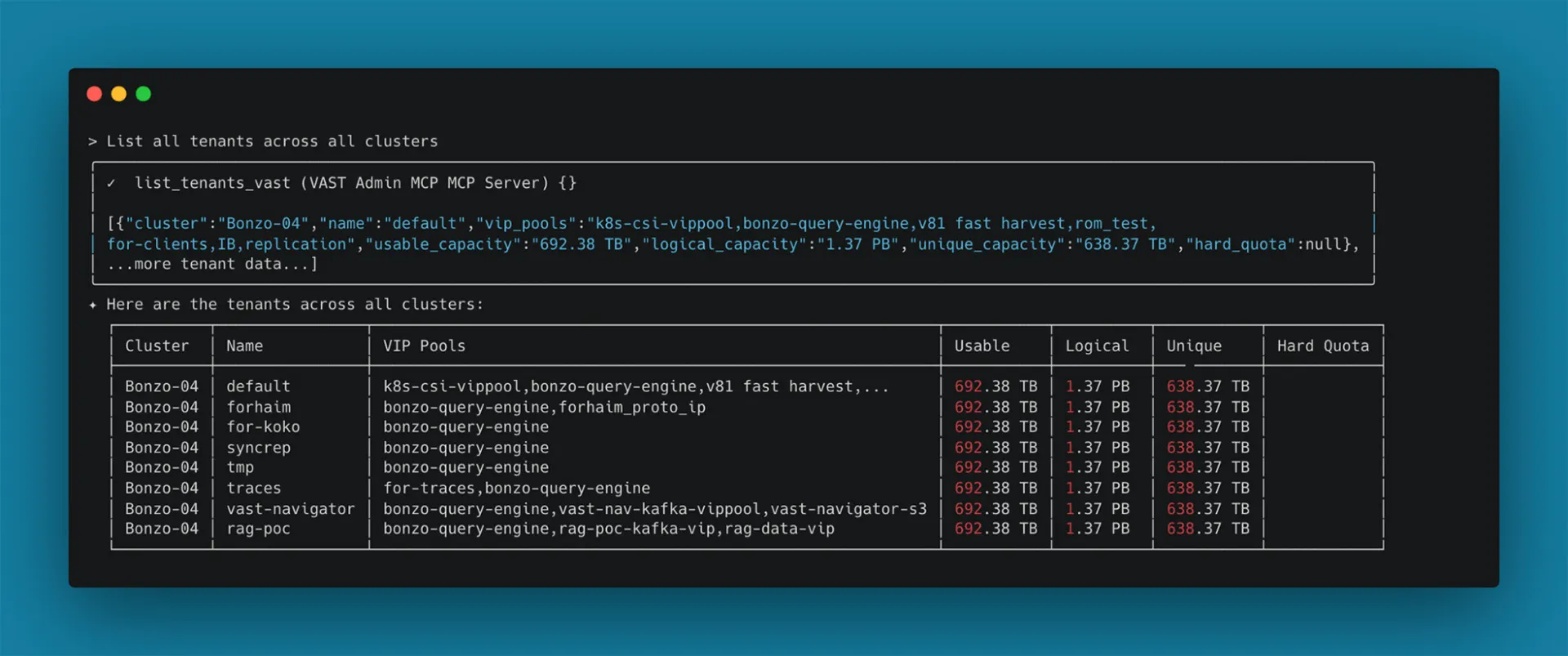
Explore tenants across clusters:
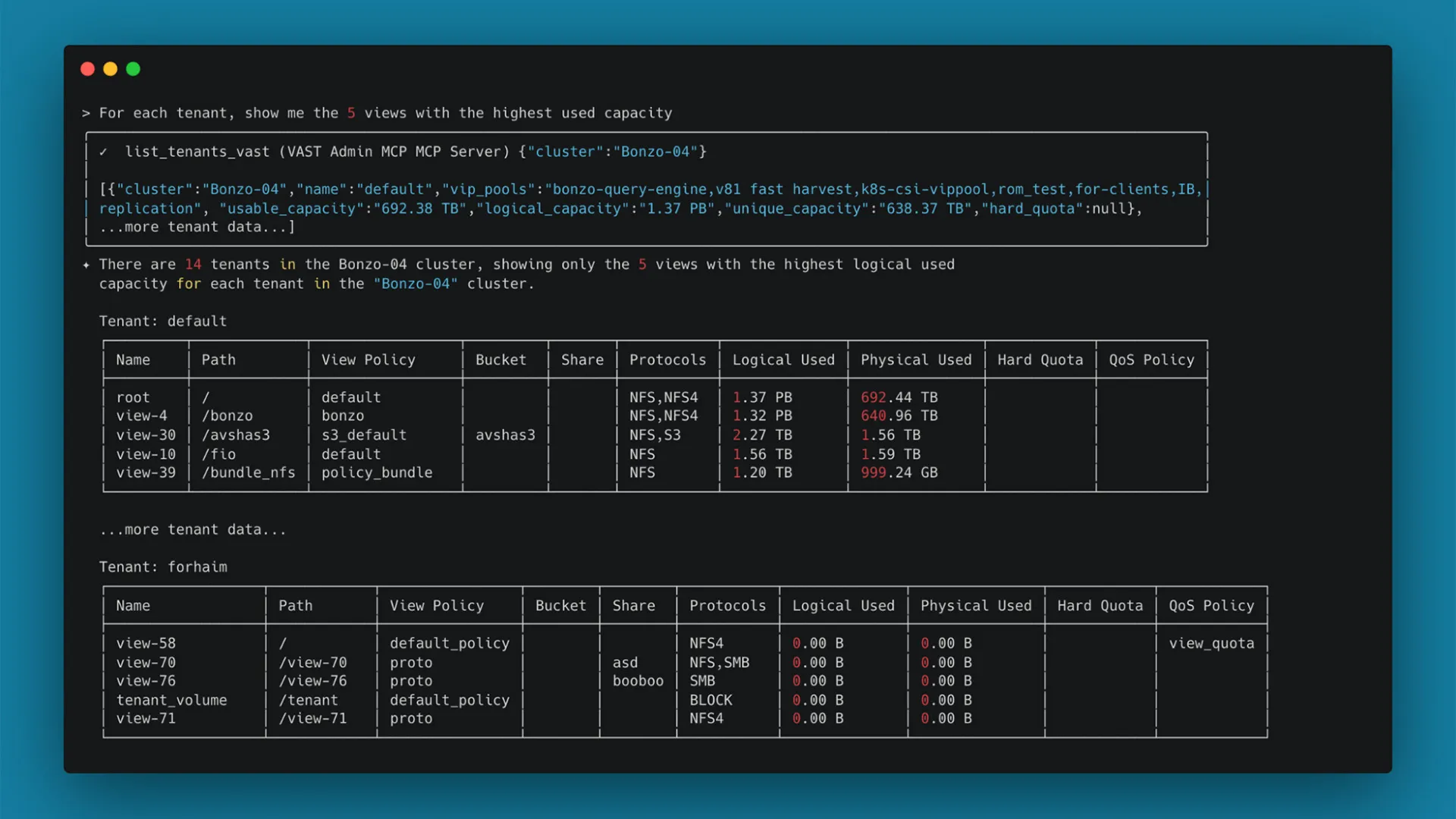
List views with used capacity:
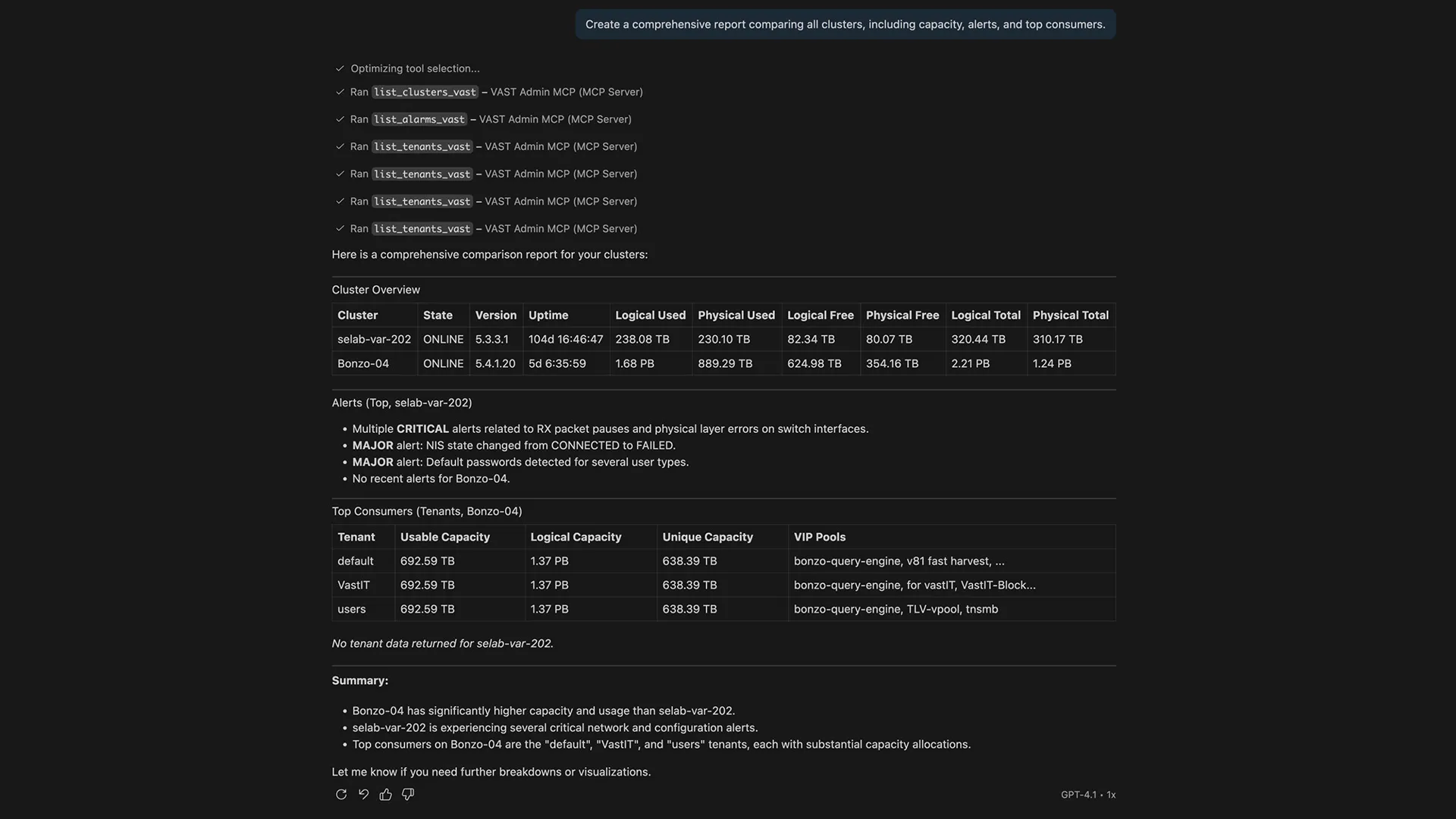
Create reports:
Generate graphs:
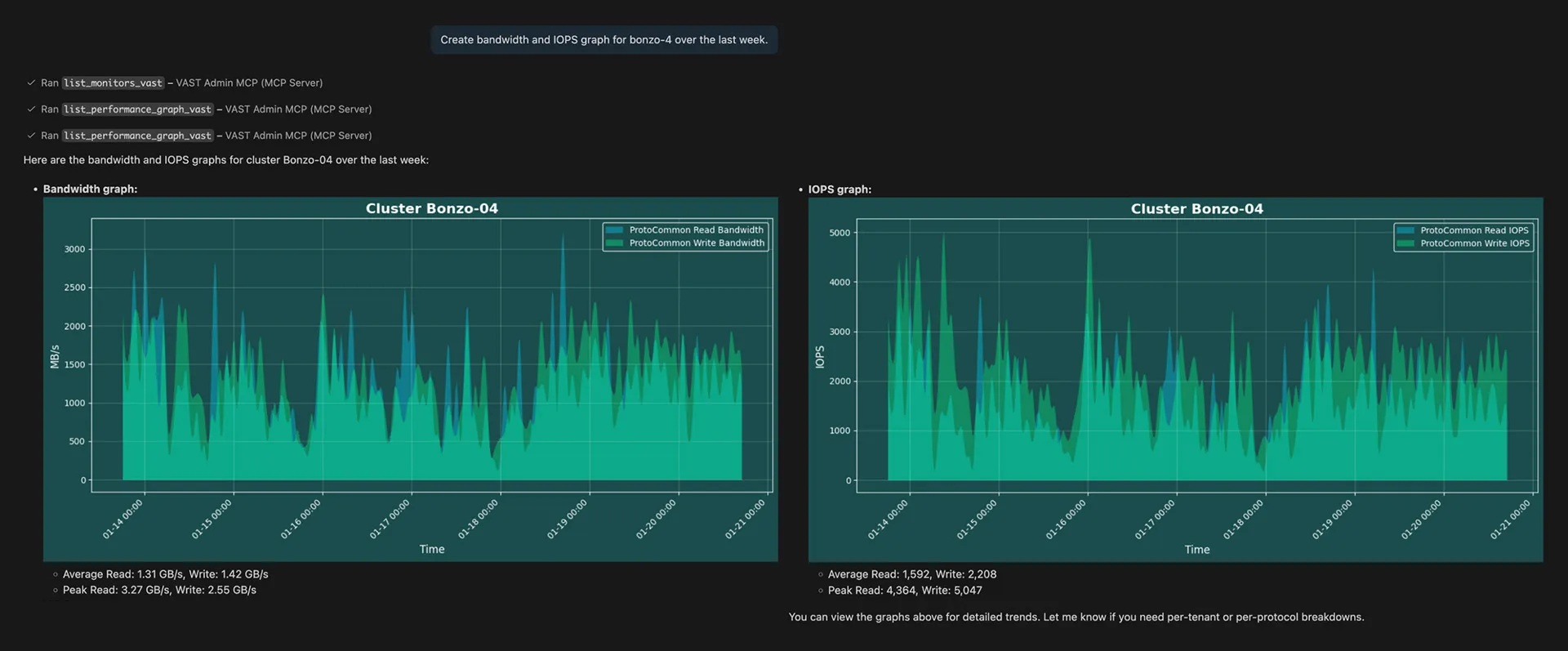
Data is synthesized across multiple API calls, generates graphs, and creates a formatted report via conversational prompts.
Beyond Monitoring: Data Infrastructure Write Operations
In read-write mode, VAST Admin MCP becomes an automation tool. Note that read-write mode requires explicit activation and is protected by API whitelist so only approved operations are allowed.
Let’s explore how to perform cluster modifications:
Snapshot Management
View Provisioning
Quota Management
Clone Operations
How VAST Admin MCP Works
Let’s go over what's happening under the hood:
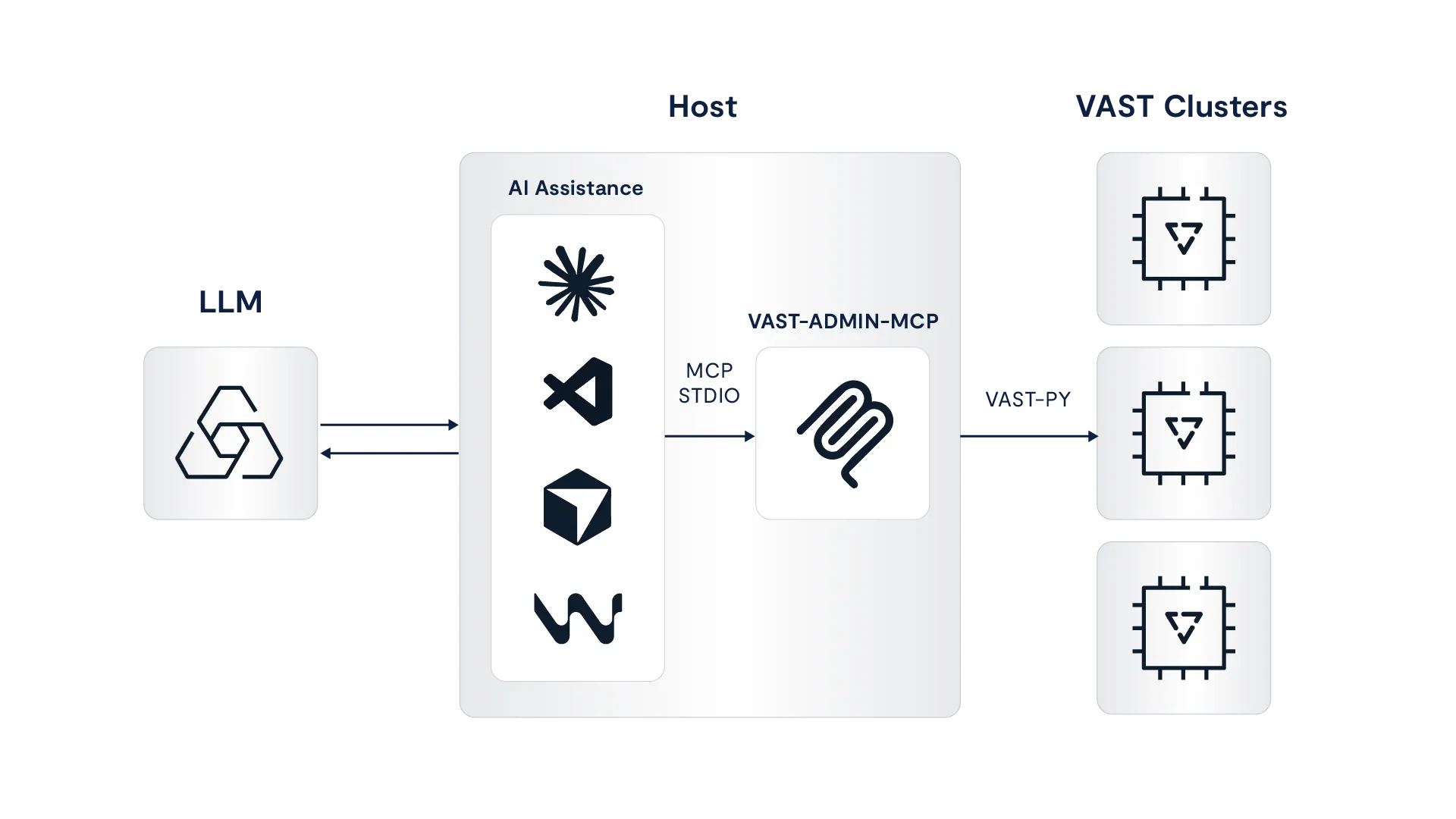
Components
MCP Server: Exposes over 30 tools (i.e. pre-defined functions) for AI assistants to call
Dynamic functions: YAML-based templates for low-code modification of tool calls
vastpy SDK: Leverages VAST Data Python SDK for API calls
Docker: Container for ease of deployment and environment isolation
Features
Context Awareness: AI models understand the relationship between logical objects like clusters, tenants, views, and quotas
Multi-step Reasoning: Chain tool calls (e.g., "find views > 1TB, then get their performance metrics")
Natural Language Filters: Use of normal language like "views prefixed with 'prod'" instead of using regex patterns
Automatic Formatting: Modify responses to be human-readable format (i.e. table, list)
Security
Let’s go over the built-in protections:
API Whitelisting: Only approved REST API endpoints and HTTP methods are accessible
Read-Only by Default: Write operations require use of explicit use of --read-write flag
Encrypted Credentials: Passwords stored in system keyring or file-based encryption
Audit Trail: All operations logged locally for compliance
Tenant Isolation: Tenant admins can only access assigned tenant
MCP in STDIO Mode: MCP runs on the same host as the AI assistance, so no network exposure
As you get started with using the MCP, consider the following best practices:
Run the MCP in docker to ensure it is isolated from other environments
Start with read-only mode for exploration and monitoring and only attempt `read-write mode` for changes that you can verify manually, preferably minor changes to start
Review the YAML template and consider ways to customize operations for specific scenarios
Looking Ahead
MCPs represent a fundamental shift in how we interact with and manage infrastructure. As highlighted in VAST's vision, we're creating the AI Operating System powering AI inference at scale. The combination of VAST's disaggregated architecture, rich API surface, and MCP's natural language interface unlocks opportunities for automation. Whether you manage two or two hundred clusters, whether you use Python or are just starting with automation, VAST Admin MCP makes your infrastructure accessible, understandable, and manageable.
We welcome questions, feedback, and feature requests. Join the conversation on Cosmos.
Build and ship on the VAST AI Operating System at VAST Forward, February 24–26, 2026 in Salt Lake City. Go deep with VAST engineers and power users in architecture-level sessions, hands-on labs, and real-world implementations of large-scale AI, data, and GPU-driven workloads. Leave with practical patterns, tooling knowledge, and certifications you can put into production immediately. Register here to join.
Additional reading:


