
Enterprise teams run on documents: contracts, research, internal reports, institutional knowledge. But most of that information is unsearchable and inaccessible at the moment it's needed. Building document search using LLMs changes that, giving employees real-time, permission-based access to the right data at the right time and ultimately opening the door to data-intensive applications like agentic research assistants.
RAG pipelines make document collections queryable in natural language, but building one means assembling a lot of moving parts: data storage, vector storage, retrieval, and access controls. By the end of this post, you’ll have deployed a working enterprise RAG pipeline that’s queryable and ready to use. We’ll leverage VAST InsightEngine, a ready-made RAG solution with minimal configuration, so you can focus on the end-user experience without the overhead of fragmented integrations.
Prerequisites
You will need the following:
Source code:
Access to NVIDIA Models:
NVIDIA NIM API Endpoints for embedding (`nvidia/llama-3.2-nv-embedqa-1b-v2`), reranking (`nvidia/llama-3.2-nv-rerankqa-1b-v2`) and reasoning (`meta/llama-3.1-8b-instruct`) models
The solution is model agnostic, so deploy any model that is compatible with the OpenAI API spec
VAST Management System (VMS) setup by VMS admin:
DataEngine is enabled for the specific tenant
VAST DataEngine:
Access to create and deploy DataEngine pipelines (pipelines = triggers + functions)
Credentials, secrets and endpoints configuration details for the VAST DataBase, S3 buckets, and LLMs are required for both pipelines and client application
Remote Kubernetes cluster to deploy client application, frontend and backend, with access to VastDB and S3 buckets
Architecture
VAST InsightEngine consists of two core components: real-time data ingestion pipelines and a prompt query API service. With fine-grained access controls built in, identity-based access policies are enforced at query execution, blocking unauthorized data access. Check out our overview of unlocking real-time AI with VAST InsightEngine to learn more.
VAST DataEngine runs InsightEngine ingest pipelines consisting of serverless functions, processing documents uploaded to a VAST S3 bucket. The end-user can then search through collections of documents via a client-facing application.
InsightEngine data pipelines run on DataEngine to scale document retrieval, chunk creation, and embedding storage. Here is the reference architecture:
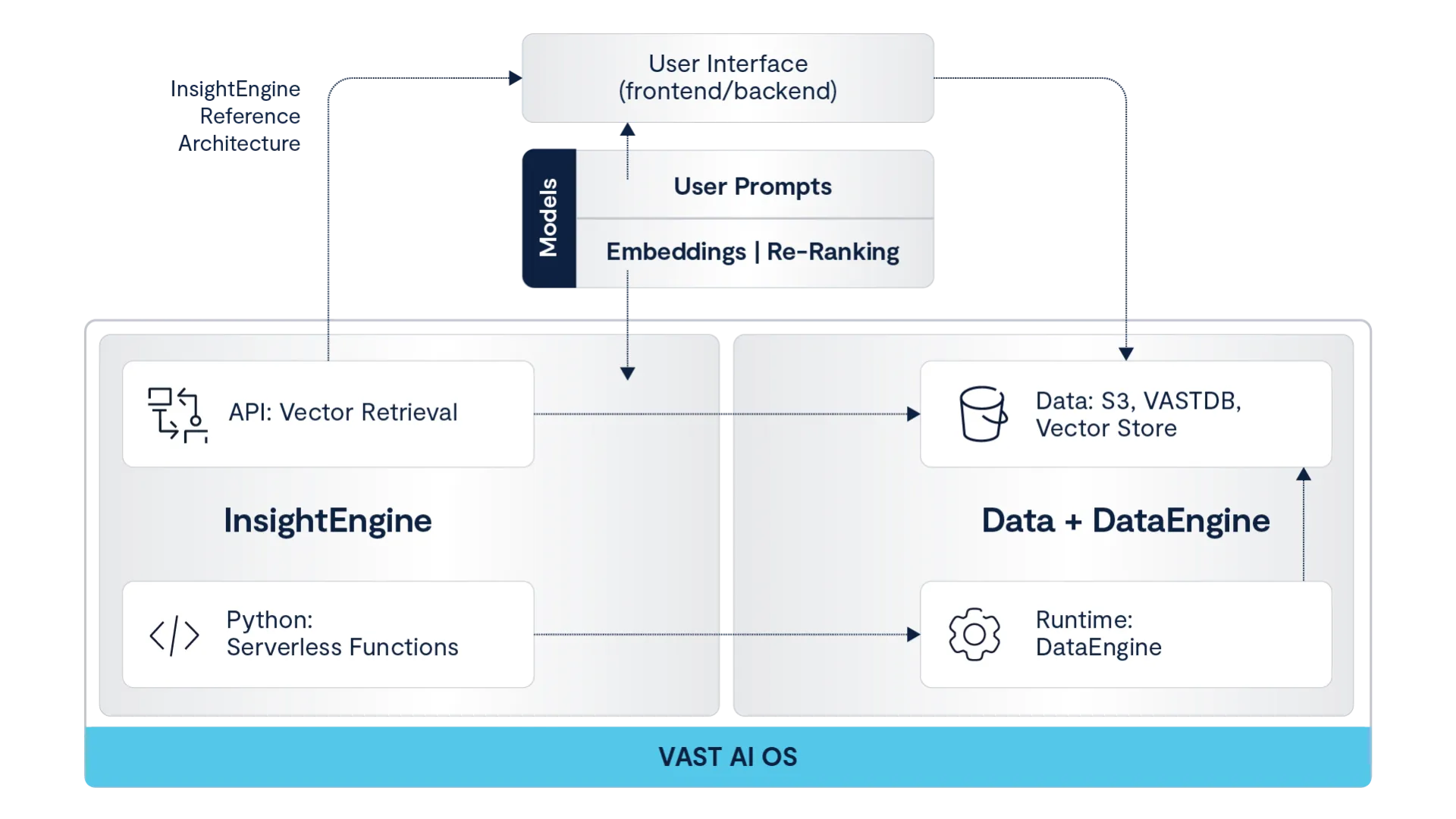
InsightEngine Overview
Let’s go over the key functionality of InsightEngine. The diagram below maps the document pipeline to support search and document retrieval through a client-facing application:
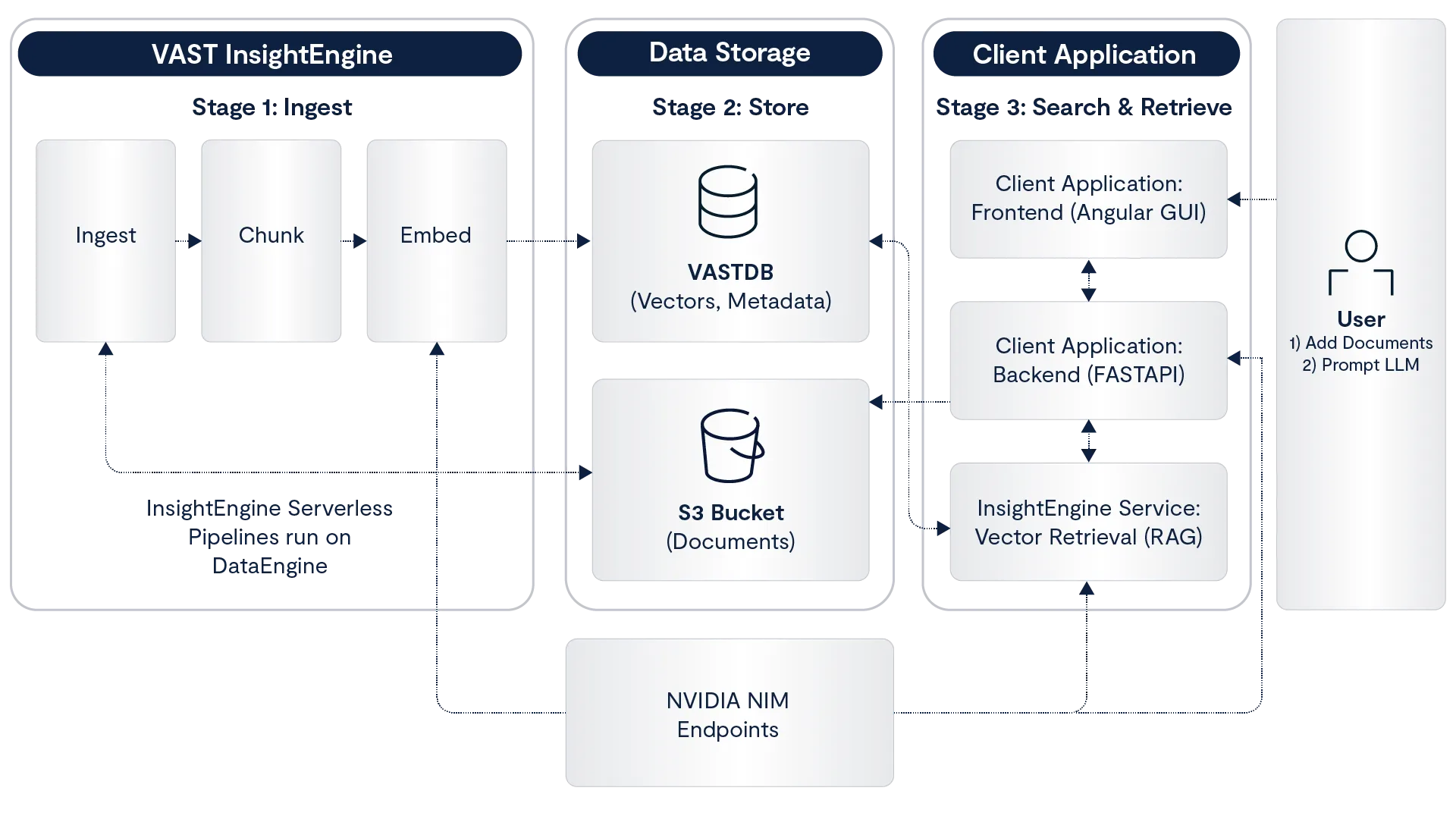
Note the three stages (1, 2, 3), we will refer to them in the subsequent sections.
InsightEngine Overview: Chunks, Embeddings, Vector Storage
These steps trace the pipeline from when an end user shares a document to when it lands on the VastDB as vectors. These steps run as serverless functions on DataEngine (Stage 1: Ingest and Stage 2: Store).
The first step is chunking. A document is split into individual, overlapping chunks, where the overlap prevents loss of context. We can control the chunk properties by specifying `chunk_size`, `chunk_overlap`, and `max_chunk_tokens`.
After we create and store chunks of the original document, the next step is generating embeddings. In this step, we can use any LLM by specifying the `embedding` properties (view below). The functionality is model-agnostic, so we are not restricted to specific models. All chunks are returned as vector embeddings, ready for storage.
In the final step, we store the embeddings in the VastDB. We build one record per chunk, including relevant data: chunk text, embedding vector, source metadata, access controls, and collection. The collection is user-dependent; think of it as a file folder for storing vectors for retrieval. Collections can be customized based on the end-user needs (i.e. department or topic specific). We have previously posted about VAST vector database architecture and performance.
Check out the GitHub repo configuration section to see all configuration required. Here is a snippet of the serverless functions config for InsightEngine:
models:
  embedding:
    - model_name: "nvidia/llama-3.2-nv-embedqa-1b-v2"
      host: "10.10.10.10"
      port: 8029
      dimensions: 2048
serverless:
  image:
    repository: "vastdataorg/insight-engine"
    tag: "serverless-ingest-0ca1c368"
    registry: "dockerhub-pub"

  # Ingestion Settings
  ingestion:
    chunk_size: "500"
    chunk_overlap: "25"
    max_tokens: "8192"
Note: the serverless functions are pre-built; the DataEngine user only needs to provide configuration to deploy InsightEngine.
Deploy InsightEngine
All functionality, from triggers to pipelines, is set up through the deployment script. After setting up the config, we can run deploy:
IE_DEPLOY="docker run --rm --network host \
  -v <YOUR_KUBECONFIG_PATH>:/root/.kube/config:ro \
  -v ./configs/config.yaml:/workspace/config.yaml:ro \
  -e IE_CONFIG_FILE=/workspace/config.yaml \
  -e ENV=default \
  vastdataorg/insight-engine-deploy:724b4600"

$IE_DEPLOY task setup-cluster
$IE_DEPLOY task deploy:backend
$IE_DEPLOY task deploy:serverless
Here is an example output for running `setup-cluster`:
$ docker run --rm --network host \
  -v ~/.kube/config:/root/.kube/config:ro \
  -v ./configs/config.yaml:/workspace/config.yaml:ro \
  -e IE_CONFIG_FILE=/workspace/config.yaml \
  -e ENV=default \
  vastdataorg/insight-engine-deploy:724b4600 task setup-cluster

🐳 Docker Entrypoint: Initializing environment...
✓ Configuration loaded successfully

🚀 Executing command: task setup-cluster

# ...setting up app user, groups, identity policies...
✓ Created access key: ACCESS_KEY

# ...setting up S3 bucket and VastDB...
✓ Using existing bucket: research-assistant-bucket
✓ Using existing VastDB view: research-assistant-bucket

# ...deploying monitoring stack (Prometheus, Grafana, OpenTelemetry, Zipkin)...
✓ MONITORING STACK INSTALLATION COMPLETE
Deploy the Client Application
In this section, we’ll review the frontend and backend client application (Stage 3. Search and Retrieve). The full-stack code is available on GitHub (frontend, backend).
To deploy the frontend and backend applications to the remote Kubernetes cluster, run the deploy script:
$ ./install.sh \
    -n research-assistant \
    -r docker.io/vastdatasolutions \
    -t v1.0 \
    -s secret.yaml \
    -c v209 \
    -g vast-researchv209.vastdata.com \
    -i

  # ...waiting for rollout...
  deployment "research-assistant" successfully rolled out
  deployment "research-assistant-gui" successfully rolled out

  NAME                              READY   STATUS    AGE
  backend-webserver-55dcdc6cd       1/1     Running   16h
  research-assistant-78db47544b     1/1     Running   21s
  research-assistant-gui-7fc5d9774  1/1     Running   19s

  [INFO] API URL: http://agent.v209
  [INFO] GUI URL: https://vast-researchv209.vastdata.com
  [INFO] Installation complete!
After authentication, users can access the research assistant UI:
When a user enters a search query, the backend calls the InsightEngine API to perform a similarity search. A query embedding is generated for the user string to search the VastDB vector field and return a matching document. The following code snippet, full details on repo, demonstrates how the backend calls InsightEngine API to perform hybrid search (vector + SQL where):
def create_retrieve_chunks_tool(token: str, base_url: str, target_collection: str):
      def retrieve_chunks(
          prompt: str,
          filters: str = "",
          with_rerank: bool = True,
          number_of_docs: int = 10,
          top_k_from_vectorstore: int = 30,
      ) -> Dict[str, Any]:
          metadata_query = _build_metadata_sql(filters)

          payload = {
              "collection_name": target_collection,
              "prompt": prompt,
              "with_rerank": with_rerank,
              "number_of_docs": number_of_docs,
              "top_k_from_vectorstore": top_k_from_vectorstore,
          }
          if metadata_query:
              payload["metadata_query"] = metadata_query

          response = httpx.post(
              f"{base_url}/api/v1/retrieve/hybrid",
              json=payload,
              headers={"Authorization": f"Bearer {token}"},
          )
          return response.json()

      return retrieve_chunks
Build on VAST
Together, these steps demonstrate how to build a real-time document search and summarization pipeline using VAST InsightEngine, DataEngine, and VastDB to enable fast, scalable, and searchable document workflows.
You can continue to explore more ways to build on VAST, and also review the VAST DataEngine Research Assistant blueprint here.


