
The Hidden Cost of Waiting for Data
Your GPUs are idling and it is costing you money.
Most AI teams see this as inevitable. Every training run starts the same way: copy data from remote storage, wait for the transfer to finish, then start training. The hydration stage, staging data locally before compute begins, is a symptom of bad data architecture.
When your data isn’t available at the speed of GPU consumption, workarounds stack up (e.g. prefetch pipelines). VAST is built from the ground up for data-intensive workloads to deliver low latency and scalable throughput that keeps GPUs fed directly, with no staging step.
VAST lets teams achieve instant data access for SkyPilot AI workloads on any compute (cloud, neocloud, on-prem) and start working immediately. Same data, same YAML, just different compute:
# cloud agnostic
file_mounts:
  /data:
    source: vastdata://my-training-data
    mode: MOUNT

resources:
  accelerators: A100:8

run: |
  torchrun --nproc_per_node=8 train.py --data /data
No hydration stage. No staging pipeline. No cache warming. Mount, Run, Done.
In this post, we’ll walk through why GPU hydration breaks at scale, how VAST and SkyPilot solve it, and how to get started.
Why Hydration Breaks at AI Scale
The hydration model works for smaller models and datasets. At AI scale, it breaks in three ways:
It wastes GPU time. Every training run begins with a dead period. Minutes to hours spent copying data while GPUs sit idle. On spot instances with frequent preemptions, hydration overhead exceeds actual training time.
It doesn't scale to multimodal workloads. Modern AI consumes images, video, audio, 3D scans, and medical imaging. These datasets reach petabytes and do not fit on local disk making hydration impossible.
It creates operational complexity. When hydration breaks down, workarounds stack up: building prefetch pipelines, caching logic, disk provisioning per node, cleanup scripts. Each provider needs its own workarounds. Teams spend more time managing data movement than training models.
VAST interface delivers the throughput that makes hydration redundant. Stream data at the throughput that keeps GPUs saturated, even for the largest AI datasets.
No Compromises: One Platform, Every Protocol
Let’s consider a multimodal inference pipeline. Preprocessing stages need fast, low-latency file access to images and video. Inference APIs need S3 object storage for integration with upstream and downstream applications. Conventional storage forces a choice:
Use S3 for scalability and cloud compatibility, or
Use NFS for its performance and compatibility with legacy training frameworks
Each choice locks out the other.
VAST eliminates the trade-off. The same data, in the same namespace, is accessible via S3 and NFS simultaneously. No copies, no sync jobs, no dual-write pipelines.
Engineers stop making trade-offs between speed and flexibility. Infrastructure teams stop managing parallel stacks.
Multi-Tenancy: Self-Service Without Losing Control
SkyPilot empowers users to be self-sufficient. Users can define compute, storage, and workload as configuration and launch with a single command. Users can create their own VAST S3 buckets via SkyPilot:
file_mounts:
  /checkpoints:
    name: team-alpha-checkpoints
    store: vastdata
When multiple teams or thousands of customers can create buckets, mount data, and consume storage bandwidth on demand, infrastructure teams need more control. VAST provides native multitenancy, purpose-built for this reality:
Capacity governance: hard quotas per tenant so no team can consume the entire storage pool
Performance isolation: guaranteed minimum throughput per tenant (e.g. no noisy neighbors)
Data isolation: fully isolated namespaces, teams cannot see or access each other’s data
Unified administration: One cluster, one control plane, not a collection of scripts and IAM policies bolted on after the fact
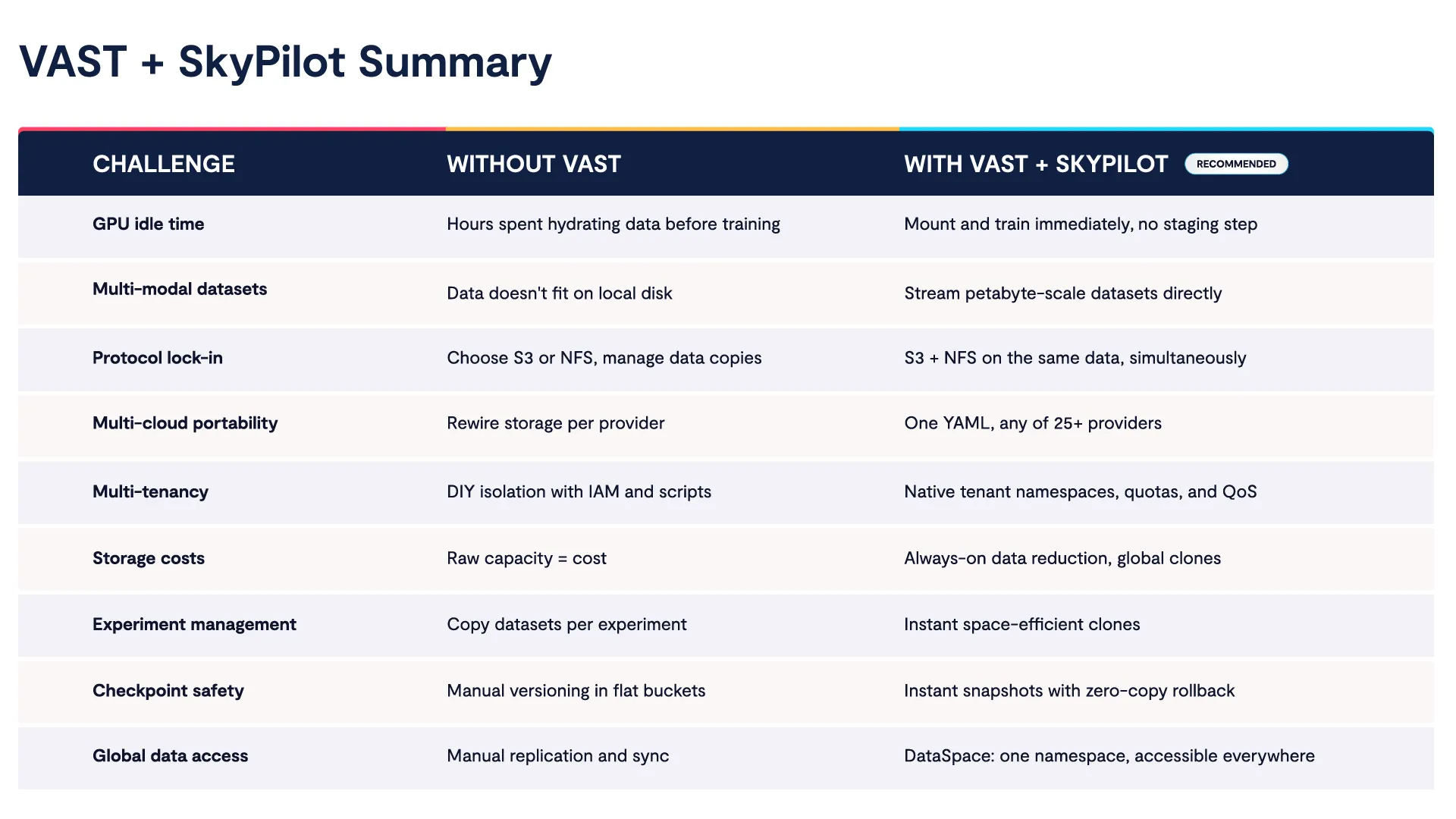
For neocloud and enterprise IT teams, VAST multi-tenancy means multiple teams or customers share one storage infrastructure with the isolation and control they expect from separate systems, at a fraction of the cost. Here is a summary of how SkyPilot and VAST address challenges together:
To learn more, see why teams choose VAST for AI.
Set Up Instant Data Access for SkyPilot AI Workloads
Let’s go over the setup to run workloads with VAST on any SkyPilot-supported provider. We’ll use Kubernetes for the compute backend and a VAST storage configuration that works across all providers:
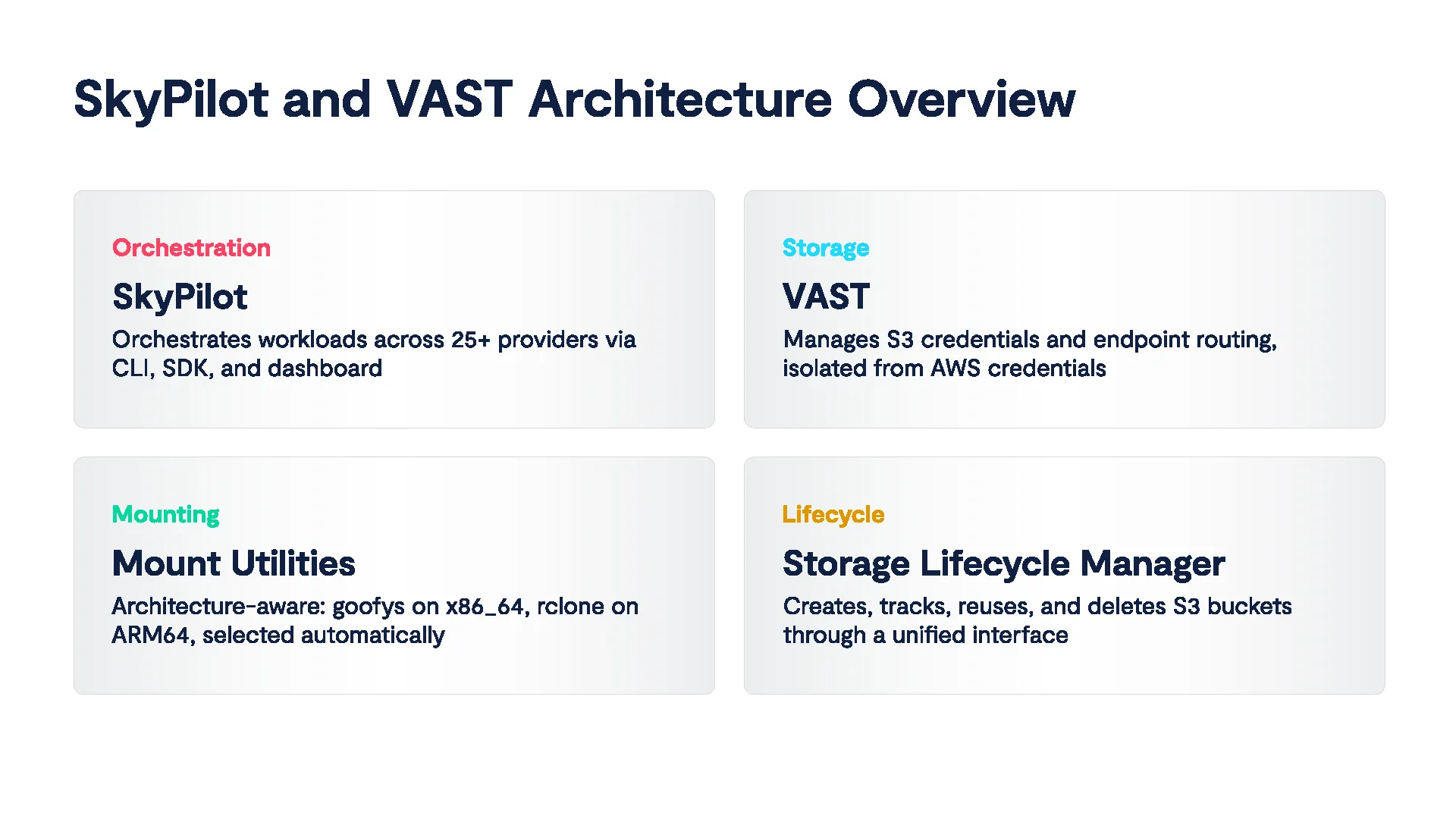
Once configured, switching compute is a one-line change.
Prerequisites
SkyPilot installed with VAST support
Kubernetes cluster with a valid kubeconfig
VAST S3 endpoint URL with access key and secret
Step 1: Start SkyPilot API Server
Before running SkyPilot commands, start the API server:
sky api start --host 0.0.0.0

✓ SkyPilot API server started.
├── SkyPilot API server and dashboard: http://0.0.0.0:46580
└── View API server logs at: ~/.sky/api_server/server.log
Now the API server and web dashboard are available (port 46580).
Step 2: Verify Compute Credentials
Verify SkyPilot can connect to your compute provider:
sky check kubernetes

Checking credentials to enable infra for SkyPilot.
  Kubernetes: enabled [compute]
  Allowed contexts:
  └── kubernetes-admin@kubernetes: enabled.
Step 3: Configure VAST Credentials
Before configuring VAST, let’s run a check to see if VAST is already set up:
sky check vastdata
Checking credentials to enable infra for SkyPilot.
  VastData: disabled
If not configured, let’s set up VAST on SkyPilot:
#Install boto3 for S3-compatible access
pip install "skypilot[vastdata]"

#Share VAST access credentials (key, secret)
AWS_SHARED_CREDENTIALS_FILE=~/.vastdata/vastdata.credentials \
  aws configure --profile vastdata
Finally, set your VAST S3 endpoint URL:
#Set VAST S3 endpoint (<ENDPOINT_URL>)

AWS_CONFIG_FILE=~/.vastdata/vastdata.config \
  aws configure set endpoint_url <ENDPOINT_URL> --profile vastdata
Step 4: Verify VAST Config
Run the check again to confirm VAST is registered as a storage backend:
sky check vastdata

Checking credentials to enable infra for SkyPilot.
  VastData: enabled [storage]

🎉 Enabled infra 🎉
  VastData [storage]
VAST is now available to use with SkyPilot.
Mounting with VAST
SkyPilot supports three storage mounting modes: `MOUNT`, `MOUNT_CACHED`, and `COPY`. The recommended default is `MOUNT` since VAST throughput supports streaming directly. Check out Setting Up SkyPilot with Kubernetes and VAST Data documentation to see other mounting options and configuration.
MOUNT: Stream Directly
Let’s set up data streams on demand from VAST. Where other backends force you into cached or copy modes to compensate for slow storage, VAST delivers streaming performance that keeps GPUs fed without staging:
#test_vast_mount.yaml
file_mounts:
  /data:
    source: vastdata://skypilot
    mode: MOUNT

resources:
  cloud: Kubernetes
  cpus: 2

run: |
  ls /data

sky launch test_vast_mount.yaml

✓ Cluster launched: sky-19aa-vastdata.
⚙ Syncing files.
Mounting (to 1 node): vastdata://skypilot -> /data
✓ Storage mounted.
⚙ Job submitted, ID: 1
(task, pid=1862) aaa
(task, pid=1862) boto3-test.txt
(task, pid=1862) created_by_goofys
(task, pid=1862) created_by_rclone
(task, pid=1862) hosts
✓ Job finished (status: SUCCEEDED).
Inspecting the mount confirms a live FUSE filesystem:
ssh sky-19aa-vastdata
mount | grep /data

skypilot on /data type fuse (rw,nosuid,nodev,relatime,user_id=0,group_id=0,default_permissions,allow_other)
Auto-Create S3 Buckets
SkyPilot can create new VAST Data S3 buckets on the fly, useful for checkpoints, outputs, or experiment data:
file_mounts:
  /checkpoints:
    name: skypilotnew
    source: ~
    store: vastdata

sky launch test_vast_create_bucket.yaml

Created S3 bucket 'skypilotnew' in auto
✓ Cluster launched: sky-405f-vastdata.
Mounting (to 1 node): skypilotnew -> /data
✓ Storage mounted.
✓ Job finished (status: SUCCEEDED).
Auto-created can by tracked and managed via SkyPilot's storage interface:
sky storage ls       		# List all managed buckets
sky storage delete skypilotnew  	# Clean up
We welcome questions, feedback, and feature requests. Join the conversation on the Cosmos User Community.


